Test and Go Live
Test the Sophi assistant on an unpublished Shopify theme copy with a preview link, publish it, assign the chat page template, roll back if needed, and fix the most common setup problems.
You test on the theme copy, against your live Sophi account, before any shopper sees it. Publishing is then one click, and undoing it is one click too.
1. Preview the copy
In the theme copy's editor, Save, then:
1 The ⋯ menu at the top. 2 Share preview copies a link that opens your store with the unpublished copy, for anyone you send it to, on any device. Preview opens it for you.
The preview is your real store with the real Sophi assistant: chats, carts and events are real, so use them freely, but stop before paying at checkout.
2. Test
Open the preview link on a computer and on a phone, and go through:
| Area | Check |
|---|---|
| Launcher | Shows on every page with your text and colours; opens the chat page (or the side panel). Not hidden behind other floating buttons. |
| Banner | Each chip opens the chat and asks its question. |
| Product box | The title starts a chat about this product. Choose another colour first: the chat shows that colour. The chips ask about the product. |
| Ask AI | Type in the search field, press the Ask AI button: the chat answers the same words. |
| Search recovery | Search for something you don't sell: the block appears with the search words in its chip. |
| Cart questions | With products in the cart, the chips answer about them. |
| Add to cart from the chat | The confirmation appears, the cart drawer or count updates, the right size/option and price (with discounts) are in the cart. |
| Checkout | From the chat, checkout opens your Shopify checkout with the same cart. Don't pay. |
| Products | Ask for a few products you know: names, prices and stock match the store. |
| Language | If your store has a language prefix (e.g. /en), cart, checkout and chat links keep it. |
| Cookie banner | Decline everything: the chat still works. Accept: everything works as above. |
| Logged in | Log in as a test customer: the chat greets them by name. |
What a good result looks like — the product box hands the product to the chat, and the assistant answers about it with real products:

Product box title → the chat opens with the product attached.
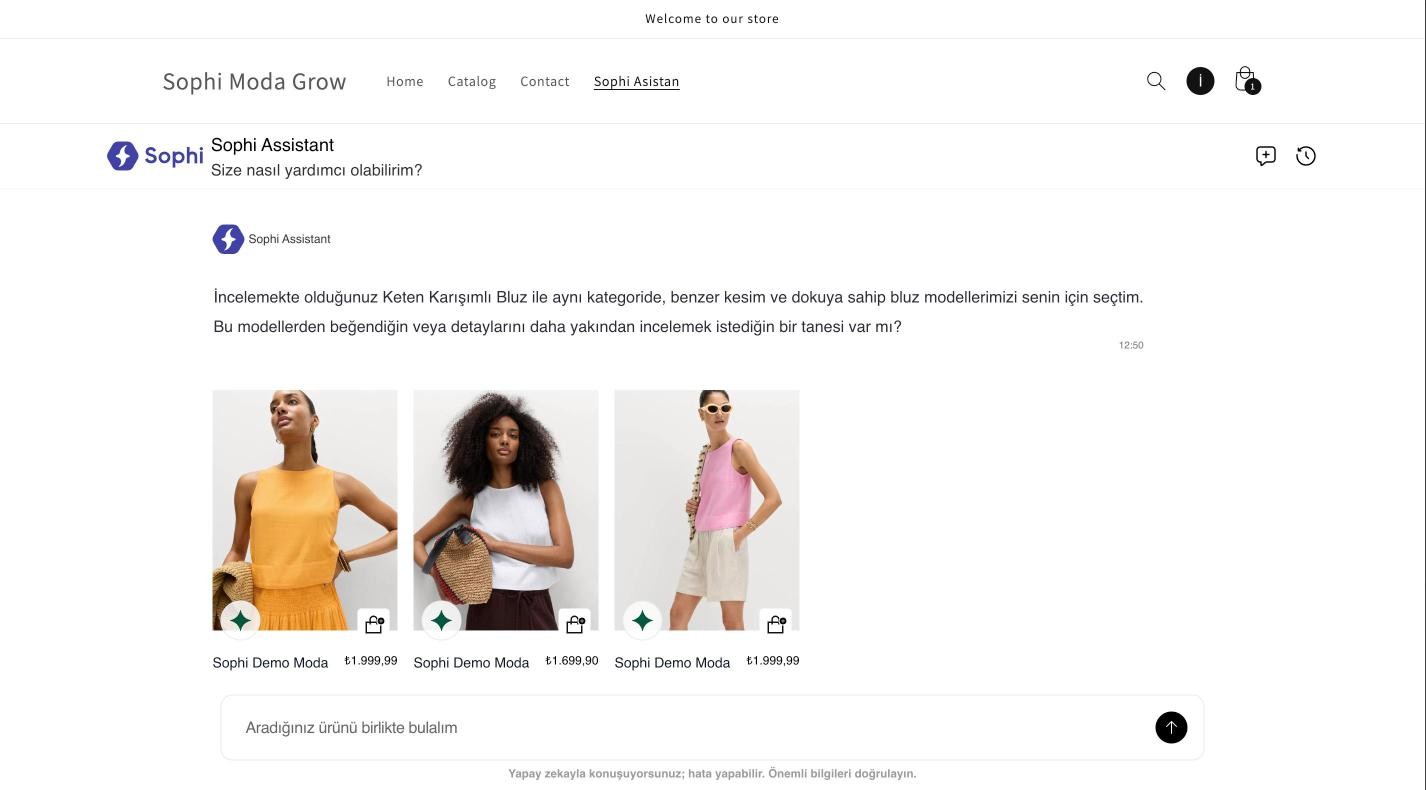
A chip → an answer with products, prices and add-to-cart buttons.
Tell the Sophi team when you've tested. We check that the events arrived and that the purchase pixel is in place.
3. Publish
When it's right, go to Online Store → Themes, open the copy's menu and select Publish. Then assign the chat template, which is now available:
- Online Store → Pages → your chat page.
- Theme template → sophi.
- Save.
Open the chat page once more on the live store to check it.
To undo, publish your previous theme again: it is unchanged under Draft themes. To hide Sophi without switching themes, switch off the Sophi assistant embed and save: the launcher, the blocks and the search button all disappear with it.
Go-live checklist
- App installed with all six permissions
- Credentials sent; first catalog import done, products visible in the Sophi platform
- All storefront domains sent to Sophi
- Sophi assistant embed on: API key, Production, chat page, texts in your language
- Send storefront events to Sophi on
- Blocks placed and their chips rewritten for your catalog
- Purchase pixel created by Sophi
- Preview tested on desktop and phone
- Theme published,
sophitemplate assigned to the chat page - Optional: menu link to the chat page
Troubleshooting
| Problem | Cause and fix |
|---|---|
| Nothing from Sophi shows on the store | The Sophi assistant embed is off, or its Sophi API key is empty. Both are in App embeds. |
| The launcher shows but the chat doesn't open or stays empty | The domain the shopper is on isn't on Sophi's list for your store. Send us every domain, with and without www. |
| The page isn't listed in Chat page | The page is hidden. Set it to Visible (Online Store → Pages). |
The sophi template isn't listed on the page | The template belongs to the theme copy; it's listed after you publish it. Until then the chat still appears at the end of the page. |
| The chat page shows the page title or an empty box above the chat | The sophi template's Page section isn't hidden. See Give it a chat template. |
| After a chat add-to-cart the cart count or drawer doesn't update | Set After chat add-to-cart to Open the cart page or Reload the page. |
| The launcher covers another button | Raise Launcher distance from bottom, or move it with Side. |
| A colour shows up as a separate option instead of separate products | The colour option has an unusual name. Add it to Colour option names, and tell Sophi the same name. |
| Products, prices or stock are out of date | The sync runs every hour. If it's longer, check that the app is still installed and the client secret wasn't rotated, then contact us. |
| No events or purchases in Sophi | Send storefront events is off, the Environment isn't Production, or the shopper declined analytics cookies. |
| A permission is missing on the install screen | Uninstall the app, have the configuration fixed, and install again. See Before you start. |
Still stuck? Contact the Sophi team with your store address and a link to the page.